

Professional Mockup Studio
Create Bulk Mockups With Your Own Blanks and Graphics
Professional Mockup Studio is a Windows desktop application that lets you upload your own blank product images and graphics or logos, place artwork visually, generate multiple mockup combinations, and export finished JPG mockups together in a ZIP. No Photoshop required.
A faster route from artwork to approval
Built for Real Mockup Work
Creating customer proofs and product mockups one at a time is repetitive. Professional Mockup Studio keeps the workflow in one focused desktop app.
FINAL PMS SCREENSHOT
Multiple Blanks + Multiple Graphics
A final-build PMS screenshot will replace this temporary staging placeholder.
FINISHED OUTPUT / EXPORT PROOF
Batch Combinations + Finished Results
A curated set of actual final-build mockups and organized JPG/ZIP output will replace this temporary staging placeholder.
The Solution
Upload the product images and graphics you already use, position the artwork once, select the combinations you need, and export the finished mockups.
Who It Is For
- Apparel decorators
- DTF and screen-printing shops
- Embroidery and promo-product sellers
- Etsy and custom-product sellers
- Small clothing brands
- Local sportswear shops
What It Does
- Upload your own blank product images.
- Upload one or many graphics or logos.
- Move, resize, rotate, and adjust artwork opacity.
- Apply an optional fabric effect.
- Generate combinations from multiple blanks and graphics.
- Export finished JPG mockups in a ZIP.
Why It Is Different
Use your own products and artwork instead of being limited to a stock template library. The app runs on your Windows computer, your files stay local, and no Photoshop experience is required.
Windows Early Access Offer
Get the tested Windows Early Access version for a one-time price of $49. Buyers receive the installer, a local license key, documentation, and the current support contact.
Roadmap
Future ideas include workflow improvements, additional export options, saved-project features, and a possible Mac version if demand supports it. Roadmap items and release dates are not guaranteed.
Four focused steps
How the App Works
Go from your own product images and artwork to finished JPG mockups without leaving the app.
1
Upload Your Blank Product Images
Add your own shirts, hats, drinkware, promotional products, or other blank product photos.
STEP 1 — FINAL PMS SCREENSHOT
Choose or upload product blanks.
A final-build screenshot will replace this temporary staging placeholder.
2
Upload Your Graphics or Logos
Add one or more customer logos, designs, or artwork files.
STEP 2 — FINAL PMS SCREENSHOT
Choose or upload graphics.
A final-build screenshot will replace this temporary staging placeholder.
3
Position and Adjust the Artwork
Move, resize, rotate, adjust opacity, and apply the realistic fabric effect.
STEP 3 — FINAL PMS SCREENSHOT
Position and adjust the graphic.
The final view will show move, resize, rotate, opacity, and fabric-effect controls. A final-build screenshot will replace this temporary staging placeholder.
4
Generate and Export Your Mockups
Create the selected blank and design combinations, then export finished JPG mockups in a ZIP.
STEP 4 — FINAL PMS SCREENSHOT
Generate and export finished mockups.
The final view will show selected combinations and organized JPG/ZIP output. A final-build screenshot will replace this temporary staging placeholder.
Windows 11 desktop software
System & Product Information
Professional Mockup Studio runs locally, uses your own product images and graphics, and exports finished JPG files in a ZIP.
Supported System
- 64-bit Windows 11
- Intel or AMD x64 processor
- 8 GB memory minimum; 16 GB recommended
- 1366 by 768 minimum display
- 1920 by 1080 recommended display
Product Behavior
- Local Windows desktop application
- JPG mockup export and ZIP delivery
- Normal mockup work runs locally
- User supplies blank product images and graphics
- Internet is required for purchase, download, updates, and support
- No tested macOS, Linux, Windows ARM, or mobile version
Windows 10 is not officially supported. License-key activation is required.
One straightforward offer
Professional Mockup Studio — Windows Early Access
$49 one-time
No monthly subscription
- Current Early Access application
- Final Version 1.0 and Version 1.x updates
- One user and up to two computers
- Local processing with files kept on your computer
- Support contact and documentation
What Early Access Means
Professional Mockup Studio is currently offered in Early Access. The core workflow is available for real business use, but additional testing, corrections, and workflow improvements are continuing before Version 1.0.
- Features and interface details may change.
- Undiscovered defects may remain.
- Keep original source images and review all exports.
- Future roadmap ideas are not guaranteed.
See the Current Workspace
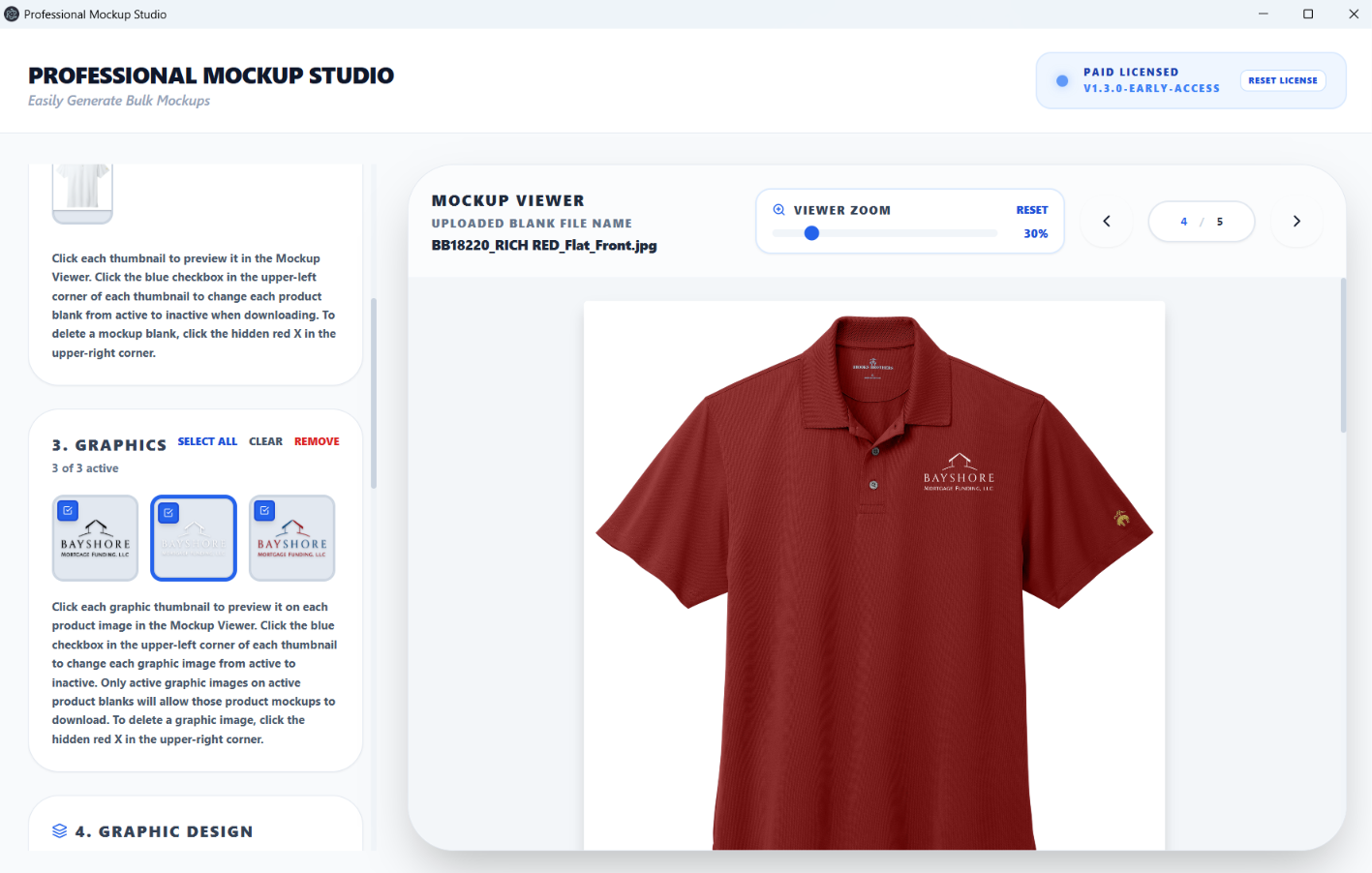
The current app workspace keeps blank images, graphics, placement controls, the live preview, and batch export in one focused view.
FULL FINAL-BUILD WORKSPACE
A Different, Fuller Application View Will Go Here
A final-build PMS screenshot will replace this temporary staging placeholder. This area is reserved for the full workspace and, if useful, a small set of light annotations pointing out the blank list, graphics list, placement controls, live preview, and batch export.
Create Product Mockups With the Blanks and Graphics Your Business Already Uses
Start with your own blanks and graphics, then export the selected combinations as organized JPGs in a ZIP.